Wednesday, October 21, 2009

Comparing Two Workers Compensation Experience Mods

by Kory Wells, WorkCompEdge Blog Editor

Many of our readers have found themselves, at one time or another, in the unfortunate position of trying to explain why the workers compensation mod went up from the previous experience period. The possible culprits are numerous and have a lot of moving parts: changes in
  • expected loss rates,
  • payroll,
  • overall loss experience, or
  • the mix of loss types (frequency, severity and/or medical-only losses)
all contribute to a change in the mod. Of course, a change can be positive or negative depending on all the moving parts. Mod increases will occur, even if loss levels remain the same, if expected loss rates fall. Business owners don't expect to pay more in premium when their business is down, but it's definitely possible. So how do you get a handle on what exactly is influencing a mod - and premium costs - from one experience period to the next?

We know you already use ModMaster to calculate and analyze the experience mod calculation (What? You don't? Learn more about ModMaster now), so in the past you would've undoubtedly used one of our many reports - perhaps the Loss Analysis by Policy Period, for example - to help see what's happened with the mod from one rating effective date to the next. Still, that involved selecting the desired mod file and requesting the desired reports, then opening up the mod file for the previous experience period and requesting those reports. So much paper and time and looking back and forth from one page to another.
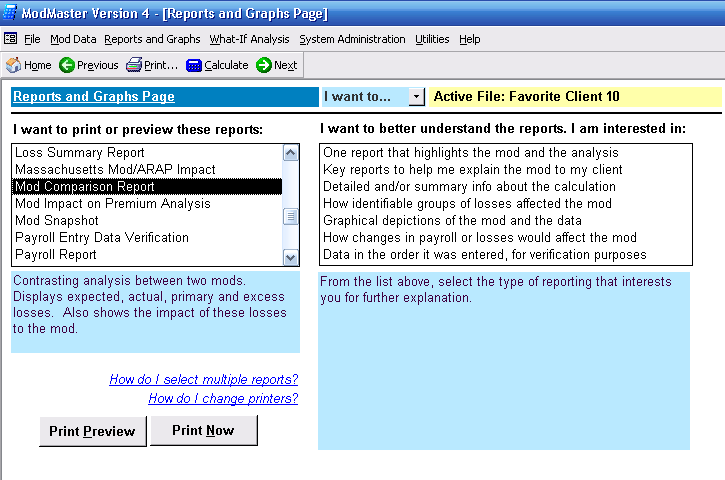
Find the new Mod Comparison report on the Reports and Graphs page of ModMaster.

But now (drum roll, please), that's all changed. The new Mod Comparison Report, available in ModMaster update 09.08 and later, produces a two-page report that shows critical information for both the current mod file and a second mod file of your choice. Here's how to use this report for best results:

1. First, let's say that you have the 2009 mod for Favorite Client already loaded into ModMaster. You're ready to put in data for the 2010 mod. Start by doing a File Utilities/Rollover of the Favorite Client 2009 to a new name, let's say Favorite Client 2010. This deletes the oldest policy year of data (in this case the 2005 policy year) and "scoots" all the other data over on the payroll and small loss pages so that the newest column is empty and awaits your data input.

2. Input payroll and loss data (either estimates or actuals, if you have the data) for the newest policy data into the Favorite Client 2010 file. This would be the 2008 policy period for our example. Also make any other adjustments to existing payroll or losses to match the bureau worksheet.

3. Calculate the mod. If there are no errors, then proceed to the Reports Menu.

4. You'll see that the Mod Comparison report is now a choice on the Reports Menu. When you click on this report and then click "Print Preview" or "Print Now," the following dialog appears:
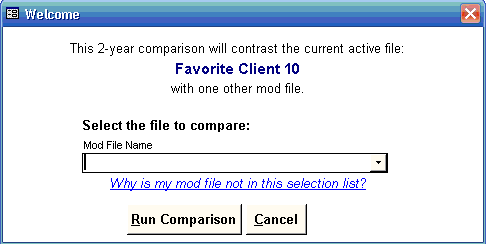
Mod Comparison report dialog

5. Now, here's the important part: when you pull down the list of mod files, be sure to select the mod file for the same risk but only one year earlier. While ModMaster will attempt to compare any two files you indicate, this report is designed to compare mods that differ by one and only one experience period. If you try to compare other mods, unpredictable results may occur, as we say in the software business.

6. After you select the mod file to compare to, click the "Run Comparison" button, and something like the following will print or preview. (Click the report image to view the report as a pdf.)


Mod Comparison sample report, page 1

Mod Comparison report, page 2

At a glance, you can see how much the mod changed from year to year, but just as importantly, how much the minimum and controllable mods have changed. You can also see what's happened with the expected and actual losses: whether they've gone up or down, and what's happening with actual to expected ratios.

In this case, we can see that the mod went up, not only because expected losses were down but also because the actual losses which dropped out of the calculation were less than the actual losses which were added for the 2008 policy period.

The new Mod Comparison report is based on a user suggestion we greatly appreciate. We've already had a new suggestion from a different user that we should also list payroll totals, not just expected losses. Give the report a try today and let us know what you think!

Wednesday, October 7, 2009

Take Our Collateral Survey

by Kory Wells, WorkCompEdge Blog Editor

As a follow-up to Michelle Bradley's recent blog article "A 2009 Collateral Perspective," we've decided to conduct a survey of professionals currently involved in collateral issues related to self-funded workers compensation liabilities.

We invite insurance brokers, risk management consultants, and risk management staff of self-funded concerns to participate in the survey, which will be open through the month of October.

The goal of the survey is to assess, on a national basis, trends in collateral negotiations, exposures, reviews, arbitration, litigation, and other factors that SIGMA has seen with its own clients this year.

Our privacy policy: At the end of the survey, we ask you to register if you'd like us to share survey results directly with you. We'll also be posting at least some of the survey results on this blog and possibly in other venues. If you supply your email address, we'll also send you an invitation to join our newsletter list. We will NOT be sending any other emails or contacting you further, nor will we share your personal data with anyone else. Also, no personally identifiable information will be shared in any survey results we publish.

The survey takes about 5 minutes to complete, and (enticement alert) you get not one, but two, special free offers at the end. Take our collateral survey now.

We appreciate your participation!

Wednesday, September 23, 2009

Improve Your Cash Flow with Pay-As-You-Go Workers Comp

by Frank Pennachio, WorkCompEdge Regular Contributor

Workers compensation policy premiums are usually based on estimated payrolls. The final earned premium is determined during a premium audit after the policy expires and is based on actual payroll. When payroll is higher than estimated, the employer owes additional premium, and when payrolls are lower than estimated, money is returned. In current economic conditions, many employers’ payrolls are declining, so an employer may be paying higher than necessary monthly installments due to an overstated payroll estimate at the inception of the policy.
paywindowIn these challenging times where cash flow is king, employers might want to consider another work comp insurance option known as Pay-As-You-Go.
View the full blog at http://workcompedgeblog.com/

Wednesday, September 9, 2009

A 2009 Collateral Perspective

by Michelle Bradley, SIGMA Actuarial Consulting Group

In October 2006, Lloyd Kelly and I authored a paper titled “Reducing Collateral Uncertainty: A Primer for Negotiations” that was published in Risk Financing Perspectives for the International Risk Management Institute. We expanded the paper in 2008 and published it as “Reducing Collateral Uncertainty” for the Institute’s Risk Financing Manual.

financials
For the purposes of this article, collateral is one type of security that can be provided to a fronting carrier or regulator by a self-insured entity for the credit risk assumed by the carrier or regulator.
View the full blog at http://workcompedgeblog.com/

Wednesday, August 19, 2009

New WorkCompEdge Licensing Options

As you may recall, we launched WorkCompEdge last fall - just in time for the economic crisis. Since the downturn affected many sectors, including insurance and risk management, we've been especially grateful to our WorkCompEdge founding members and to all of our ModMaster customers who evaluated WorkCompEdge. Time and again, we've heard similar feedback, however, and that's led us to make some changes to our WorkCompEdge licensing options we think you'll be excited about. Here are the highlights:


Our new Agency Plus license represents some cool savings over previous WorkCompEdge license options for agencies and similar providers. Thanks for giving us your feedback!

IF YOU ARE AN AGENCY, BROKERAGE, INSURANCE COMPANY, CONSULTANT, PEO, TRUST, ETC.

For only $1,000 per year, the new and very affordable WorkCompEdge Agency Plus license offers agencies and similar providers the opportunity to access WorkCompEdge for internal training and coordination of service activities in 15 different areas that affect work comp costs, including:

* hiring practices,
* safety,
* the premium audit,
* mod verification and analysis,
* medical clinic relationships,
* return-to-work,
* and much more.

As you probably know if you're a regular reader of this blog, site access includes to-the-point educational modules PLUS strategy and tools to help you evaluate a company's entire work comp picture.

For an additional $500 per client, you can add the option for your clients to have direct access to WorkCompEdge and the WorkCompEdge Safety Training Center.

The Agency Plus license can be purchased as an add-on to your annual ModMaster subscription, or you can contact us for a prorated license until the time your subscription is due for renewal.

IF YOU ARE INTERESTED IN AN AREA "EXCLUSIVE" LICENSE TO WORKCOMPEDGE

For agencies who are eager for exclusive access to the benefits and competitive advantage of WorkCompEdge, we've enhanced the Member Agency Exclusive license to include custom marketing support, flexible employer seats, unique educational opportunities, and more. A number of our founding members have already converted to this license, which is priced at $850 per month. Some markets - including Albuquerque, Atlanta, Buffalo, Shreveport, and parts of Maryland, Minnesota, and Wisconsin - are already closed.

IF YOU'RE AN EMPLOYER

WorkCompEdge is still available through your favorite agent, broker or consultant on terms they specify. It's also available directly from us for $500 per year.

FAQs

Q: If someone else gets an exclusive license in my area, does that affect my ModMaster subscription?

A: Absolutely not. It only affects your ability to be a registered WorkCompEdge user. You will still be an important ModMaster client, participate in our forthcoming WorkCompWisdom program, and glean valuable knowledge from our blog and other resources.

Q. Exactly what are the fifteen modules in WorkCompEdge?

A. A graphic showing all of the modules is at http://www.specificsoftware.com/wce/videointros.htm. Click on any of the module titles to see the short video introduction to that module. At $1,000, we believe you'll get your money's worth by using even ONE of these modules!

MORE DETAILS

Learn more about the new WorkCompEdge license options at http://www.specificsoftware.com/wce/pricing.htm

If WorkCompEdge interests you, act soon! To order or inquire further, contact Helene Pellett at 800-929-4052 x 205 or helene_pellett@specificsoftware.com

Wednesday, August 5, 2009

LinkedIn: Your Objections, and Why You Should Get Over Them Now

We’re grateful that several hundred of our readers and clients took the time to participate in our recent survey “How Do You Stay Informed and Connected?” We’re still compiling the results, but for today, I want to focus on one trend that was glaringly evident: professionals in the insurance industry (which made up 98% of our respondents) are not taking advantage of social media sites like LinkedIn and Twitter. Now, admittedly, Twitter is still pretty new, so it may be understandable that more folks in the insurance industry haven’t yet experimented with it. But LinkedIn? A whopping 85% of our respondents say they’re not using LinkedIn. While we understand that social media may not be for everyone, at least exploring the possibilities - particularly if you are in business-to-business (b2b) sales or service - should be an objective for every business, period. So let's talk more about LinkedIn today.
Here are some common reasons our respondents said they’re not using LinkedIn

Connect with our CEO Tim Coomer or blog editor Kory Wells on LinkedIn.

Thursday, July 23, 2009

Take Our Survey: How Do You Stay Informed and Connected?


Several years ago, Specific Software conducted a survey about favorite online sources of insurance and risk management news and information. The survey garnered some media attention in the industry and was useful to us internally as we developed marketing and publicity plans.

You can now follow WorkCompEdge on Twitter!


But that was a few years ago! With the growth of both content and "2.0" applications on the web, we've decided it's time to resurrect the survey, with a few new questions geared towards not just information, but how you stay connected with colleagues and clients.

Whether you're an insurance or risk management professional or a business insurance consumer, please take our survey "How Do You Stay Informed and Connected?" now.

While I'm on the topic of staying connected, this is a good time to mention that you can now follow WorkCompEdge on Twitter. I'm trying to tweet at least once a day with some sort of information about workers comp, general insurance and risk management, general business or technology news, or news about Specific Software and SIGMA Actuarial that I hope others may find interesting.

You can use Twitter for free simply through the Twitter website - using your cell phone is optional. I've found that starting just by using the web interface is a good, low-impact way to try it out.

In general, the insurance industry doesn't seem to be embracing social media as quickly as other industries. But numerous activities, such as the recent AMS Users' Group Social Media Road Trip, Insurance Journal's promotion of social media webinars, and consultant Rick Morgan's blog entry "Insurance Agents Don't Market," suggests that we are on the cusp of change when it comes to how we connect with each other and our clients.

We'd love to hear your thoughts in our survey - and in the blog comments!